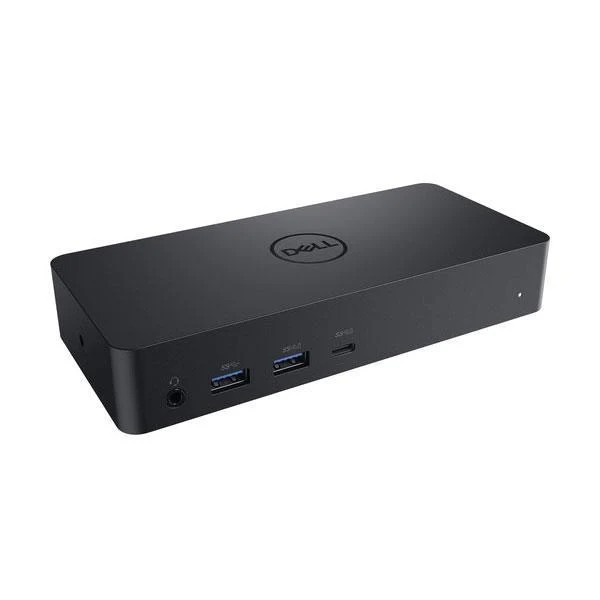
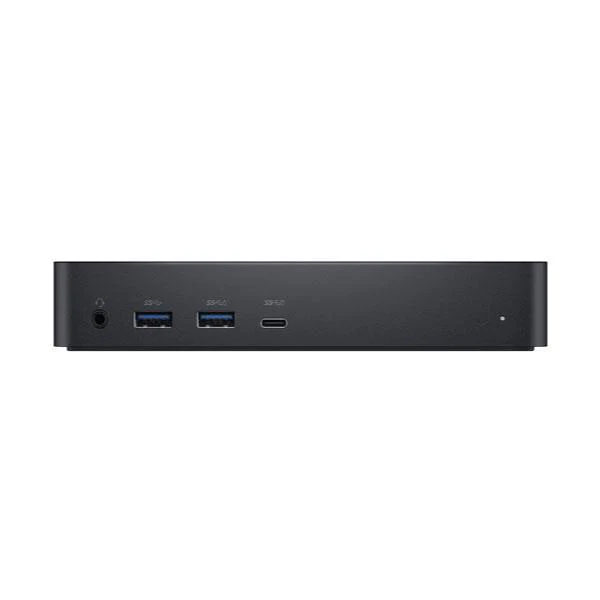
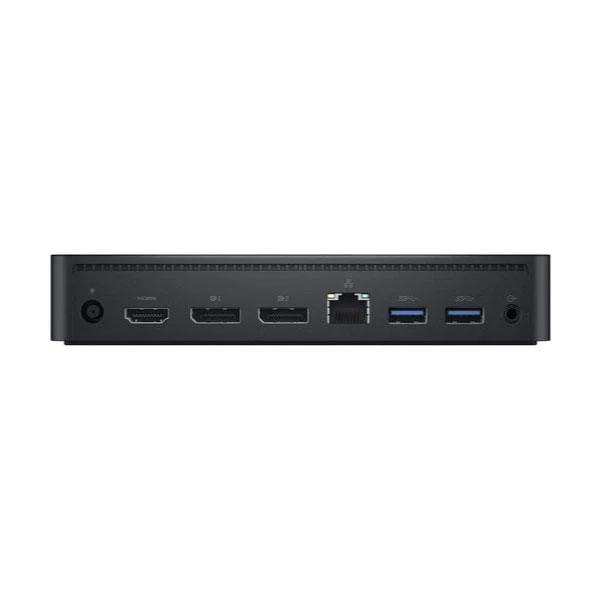
Dell D6000 USB-C USB 3.0 UHD 4K HDMI DP Docking Station No Adapter
Dell D6000 Universal Docking Station — USB-C & USB 3.0, Triple 4K Display
The Dell D6000 Universal Dock connects your USB-C or USB 3.0 laptop to up to three 4K UHD displays simultaneously, plus Gigabit Ethernet, multiple USB ports, and audio — all through a single cable. Powered by DisplayLink technology, it works across Windows, macOS, and ChromeOS without being tied to one laptop brand. Backed by a 3-month Reboot IT warranty.
Key Benefits
- Universal USB-C and USB 3.0 compatibility — Works with any laptop brand via the attached USB-C cable with integrated USB-A adapter, supporting modern and older USB 3.0-only laptops alike
- Triple 4K UHD display support — Drive up to three monitors at once via 1× HDMI and 2× DisplayPort outputs, ideal for traders, developers, and multi-screen productivity setups
- Gigabit Ethernet for stable networking — Replace unreliable Wi-Fi with wired GbE for consistent speeds during video conferencing, large file transfers, and VPN access
- Six USB ports with PowerShare — 3× USB 3.0 Type-A plus 1× USB 3.0 PowerShare and 1× USB-C PowerShare, keeping devices charged even when the laptop sleeps
- Dual audio connections — 3.5mm combo jack and dedicated stereo line-out support headsets, external speakers, and conference room audio simultaneously
- One-cable workstation connection — Plug in a single cable and all displays, network, and peripherals activate instantly — ideal for hot-desk and shared workstation environments
Performance in Daily Use
The Dell D6000 excels in office environments where productivity depends on screen real estate and reliable connectivity. Professionals who move between meetings and desk work appreciate the single-cable connection: plug in and all monitors, Ethernet, and peripherals activate within seconds. The DisplayLink chipset handles display rendering independently, keeping your laptop GPU free for applications.
For multi-monitor setups, the D6000 drives up to three 4K screens — a genuine advantage for finance, software development, and design workflows where display space translates directly to productivity. The PowerShare USB ports keep phones and tablets topped up without requiring additional chargers on the desk.
Important: A power adapter is required to operate the dock but is not included. DisplayLink drivers must be installed (free from displaylink.com). This dock does not provide laptop Power Delivery (charging).
Technical Specifications
| Specification | Details |
|---|---|
| Connection | USB-C attached cable with integrated USB-A adapter |
| Video Outputs | 1× HDMI, 2× DisplayPort — up to 3× 4K UHD (3840×2160) simultaneous |
| USB Ports | 3× USB 3.0 Type-A, 1× USB 3.0 Type-A (PowerShare), 1× USB-C (PowerShare) |
| Network | Gigabit Ethernet (RJ-45) |
| Audio | 3.5mm combo audio in/out, stereo audio line-out |
| Technology | DisplayLink — multi-brand, multi-OS compatible |
| OS Support | Windows 7/8.1/10/11, macOS 10.10+, ChromeOS, Ubuntu Linux |
| Power | External power adapter required (not included) |
| Warranty | 3-month Reboot IT warranty |
Is the Dell D6000 Right for You?
|
✓ Best For: • Laptop users needing multiple monitors • Hot-desk and shared workstation setups • USB-C and USB 3.0 laptops from any brand • Users needing wired GbE on a slim laptop • Offices wanting single-cable desk connections |
✗ Not Recommended For: • Thunderbolt-only docking requirements • GPU-intensive or gaming display use • Users requiring laptop Power Delivery • Laptops with USB 2.0-only ports |
Condition Grades
| Grade | Cosmetic Condition | Functional Testing |
|---|---|---|
| A — Excellent | Minimal signs of use, near-new appearance | All ports, outputs, and audio verified |
| B — Good | Light surface marks, fully functional | All ports, outputs, and audio verified |
Frequently Asked Questions
Does the Dell D6000 require drivers?
Yes — DisplayLink drivers are required for display output, available free from displaylink.com. They support Windows, macOS, ChromeOS, and Ubuntu Linux.
What is the maximum resolution per display?
Each output supports up to 4K UHD (3840×2160) when used with compatible cables and a 4K-capable display and laptop.
Is a power adapter included?
No — the power adapter is not included. The dock requires its own power supply and does not draw power from your laptop's USB port.
Can it work with USB 3.0 (non-USB-C) laptops?
Yes. The attached USB-C cable includes an integrated USB Type-A adapter, making it fully compatible with standard USB 3.0 ports on older laptops.
Will the dock charge my laptop?
No — this dock does not support Power Delivery. Continue using your laptop's original charger alongside the dock.
What shipping costs apply?
Shipping costs apply based on size and destination — rates are calculated at checkout.
Warranty & After-Sales Support
This Dell D6000 Universal Docking Station includes a 3-month warranty from Reboot IT, covering all hardware defects and functional issues from the date of purchase.
Reboot IT has been Australia's trusted refurbished IT specialist since 2001. Every unit is professionally tested — all ports, display outputs, USB connections, and audio verified before dispatch. Shop with confidence at reboot-it.com.au.
Product Information
Product Information
Shipping & Returns
Shipping & Returns
Description
Dell D6000 Universal Docking Station — USB-C & USB 3.0, Triple 4K Display
The Dell D6000 Universal Dock connects your USB-C or USB 3.0 laptop to up to three 4K UHD displays simultaneously, plus Gigabit Ethernet, multiple USB ports, and audio — all through a single cable. Powered by DisplayLink technology, it works across Windows, macOS, and ChromeOS without being tied to one laptop brand. Backed by a 3-month Reboot IT warranty.
Key Benefits
- Universal USB-C and USB 3.0 compatibility — Works with any laptop brand via the attached USB-C cable with integrated USB-A adapter, supporting modern and older USB 3.0-only laptops alike
- Triple 4K UHD display support — Drive up to three monitors at once via 1× HDMI and 2× DisplayPort outputs, ideal for traders, developers, and multi-screen productivity setups
- Gigabit Ethernet for stable networking — Replace unreliable Wi-Fi with wired GbE for consistent speeds during video conferencing, large file transfers, and VPN access
- Six USB ports with PowerShare — 3× USB 3.0 Type-A plus 1× USB 3.0 PowerShare and 1× USB-C PowerShare, keeping devices charged even when the laptop sleeps
- Dual audio connections — 3.5mm combo jack and dedicated stereo line-out support headsets, external speakers, and conference room audio simultaneously
- One-cable workstation connection — Plug in a single cable and all displays, network, and peripherals activate instantly — ideal for hot-desk and shared workstation environments
Performance in Daily Use
The Dell D6000 excels in office environments where productivity depends on screen real estate and reliable connectivity. Professionals who move between meetings and desk work appreciate the single-cable connection: plug in and all monitors, Ethernet, and peripherals activate within seconds. The DisplayLink chipset handles display rendering independently, keeping your laptop GPU free for applications.
For multi-monitor setups, the D6000 drives up to three 4K screens — a genuine advantage for finance, software development, and design workflows where display space translates directly to productivity. The PowerShare USB ports keep phones and tablets topped up without requiring additional chargers on the desk.
Important: A power adapter is required to operate the dock but is not included. DisplayLink drivers must be installed (free from displaylink.com). This dock does not provide laptop Power Delivery (charging).
Technical Specifications
| Specification | Details |
|---|---|
| Connection | USB-C attached cable with integrated USB-A adapter |
| Video Outputs | 1× HDMI, 2× DisplayPort — up to 3× 4K UHD (3840×2160) simultaneous |
| USB Ports | 3× USB 3.0 Type-A, 1× USB 3.0 Type-A (PowerShare), 1× USB-C (PowerShare) |
| Network | Gigabit Ethernet (RJ-45) |
| Audio | 3.5mm combo audio in/out, stereo audio line-out |
| Technology | DisplayLink — multi-brand, multi-OS compatible |
| OS Support | Windows 7/8.1/10/11, macOS 10.10+, ChromeOS, Ubuntu Linux |
| Power | External power adapter required (not included) |
| Warranty | 3-month Reboot IT warranty |
Is the Dell D6000 Right for You?
|
✓ Best For: • Laptop users needing multiple monitors • Hot-desk and shared workstation setups • USB-C and USB 3.0 laptops from any brand • Users needing wired GbE on a slim laptop • Offices wanting single-cable desk connections |
✗ Not Recommended For: • Thunderbolt-only docking requirements • GPU-intensive or gaming display use • Users requiring laptop Power Delivery • Laptops with USB 2.0-only ports |
Condition Grades
| Grade | Cosmetic Condition | Functional Testing |
|---|---|---|
| A — Excellent | Minimal signs of use, near-new appearance | All ports, outputs, and audio verified |
| B — Good | Light surface marks, fully functional | All ports, outputs, and audio verified |
Frequently Asked Questions
Does the Dell D6000 require drivers?
Yes — DisplayLink drivers are required for display output, available free from displaylink.com. They support Windows, macOS, ChromeOS, and Ubuntu Linux.
What is the maximum resolution per display?
Each output supports up to 4K UHD (3840×2160) when used with compatible cables and a 4K-capable display and laptop.
Is a power adapter included?
No — the power adapter is not included. The dock requires its own power supply and does not draw power from your laptop's USB port.
Can it work with USB 3.0 (non-USB-C) laptops?
Yes. The attached USB-C cable includes an integrated USB Type-A adapter, making it fully compatible with standard USB 3.0 ports on older laptops.
Will the dock charge my laptop?
No — this dock does not support Power Delivery. Continue using your laptop's original charger alongside the dock.
What shipping costs apply?
Shipping costs apply based on size and destination — rates are calculated at checkout.
Warranty & After-Sales Support
This Dell D6000 Universal Docking Station includes a 3-month warranty from Reboot IT, covering all hardware defects and functional issues from the date of purchase.
Reboot IT has been Australia's trusted refurbished IT specialist since 2001. Every unit is professionally tested — all ports, display outputs, USB connections, and audio verified before dispatch. Shop with confidence at reboot-it.com.au.