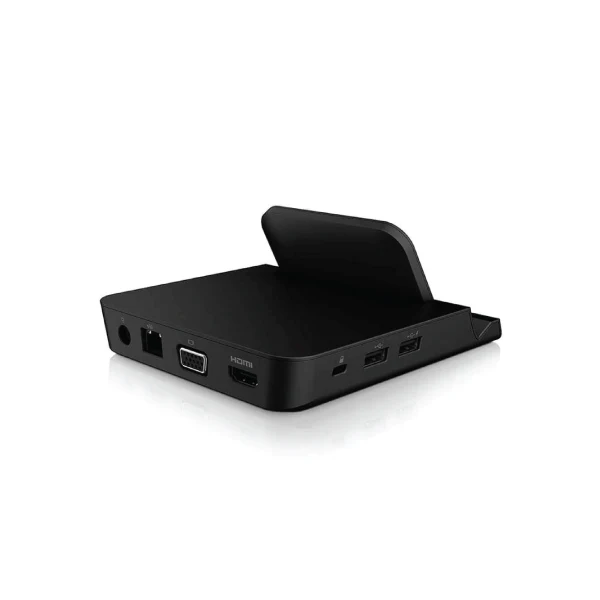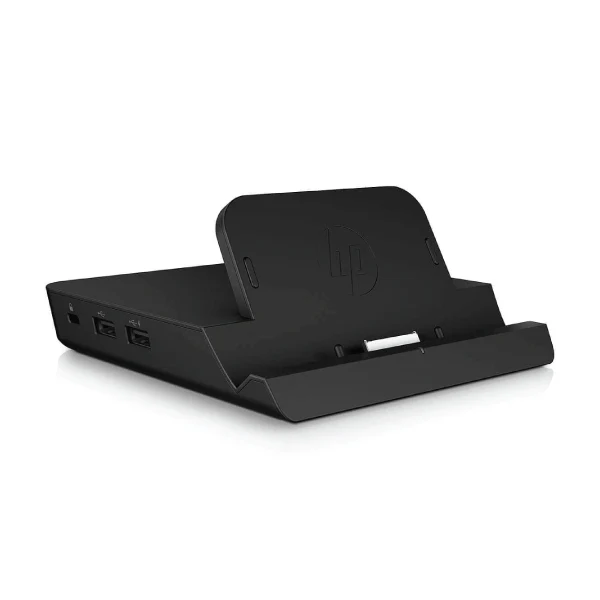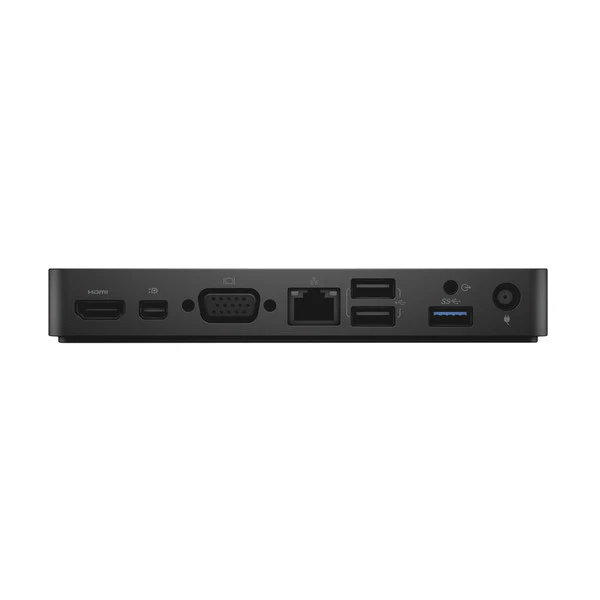
Dell WD15 USB-C Buisness Docking Station | No Adapter
Refurbished Dell WD15 USB-C Business Docking Station — Power Adapter Not Included
Expand your Dell laptop into a full workstation with the WD15 — HDMI, VGA, Mini DisplayPort, 5× USB, Gigabit Ethernet and audio through one USB-C cable, from $29 inc-GST with a 12-month warranty from Reboot IT. Note: a compatible Dell 130W USB-C power adapter is required separately and is not included.
Why Choose the Dell WD15 Docking Station?
- Single-Cable Desktop Expansion: One USB-C connection to your laptop instantly activates all peripherals, displays, and network — no daily cable management.
- Triple External Display Support: HDMI, VGA, and Mini DisplayPort run simultaneously for up to three monitors, ideal for financial, design, or multi-app workflows.
- Five USB Ports: Three SuperSpeed USB 3.0 (5Gbps) and two USB 2.0 ports connect keyboards, mice, external drives, and printers concurrently.
- Gigabit Ethernet: Stable 1000Mbps wired connection delivers reliable throughput for video conferencing, large uploads, and cloud applications.
- Dedicated Audio I/O: 3.5mm headphone output and microphone input support clear conference calls without consuming USB ports.
- Professionally Refurbished: Each unit passes Reboot IT's connectivity and port-function testing before dispatch, ensuring reliable day-one performance.
Performance in Daily Business Use
The WD15 suits office professionals who need a consistent, reliable desktop setup every day. Connect your Dell laptop once in the morning and your dual monitors, keyboard, mouse, USB headset, and wired Ethernet are all live immediately. The dock handles mixed-workload demands — spreadsheets, Zoom calls, and large file transfers — without port contention or dropouts.
Hot-desk environments benefit most: each desk needs only the dock, and staff bring their laptop. This eliminates the need for separate USB hubs, audio adapters, and display adapters at every station. Three display outputs also suit users who span content across extended screen configurations for coding, financial analysis, or trading dashboards.
Technical Specifications
| Specification | Details |
|---|---|
| Model | Dell WD15 USB-C Docking Station |
| Host Connection | USB-C (single cable to laptop) |
| USB 3.0 Ports | 3 × SuperSpeed USB 3.0 (5 Gbps) |
| USB 2.0 Ports | 2 × USB 2.0 (480 Mbps) |
| Display Outputs | 1× HDMI, 1× VGA, 1× Mini DisplayPort (max 3 monitors) |
| Network | 1 × Gigabit Ethernet RJ-45 |
| Audio | 3.5mm Headphone Out + 3.5mm Microphone In |
| Power Adapter | Not included — Dell 130W USB-C adapter required (sold separately) |
| Compatible Laptops | Dell XPS, Latitude 5xxx/7xxx, Precision with USB-C/Thunderbolt 3 (2016+) |
| Dimensions / Weight | 206 × 81 × 28 mm / approx. 635 g |
Is the Dell WD15 Right for You?
|
✓ Best For: • Dell USB-C laptop users needing a multi-monitor desk setup • Hot-desking environments needing fast dock/undock • Users who want wired Ethernet and a USB hub combined • Budget-conscious buyers upgrading from USB-A docks |
✗ Not For: • Non-Dell laptops or older USB-A only machines • Thunderbolt 3 4K or high-refresh gaming use cases • Users expecting laptop charging included out of the box • Setups needing only a single display connection |
Condition Grades
| Grade | Cosmetic Condition |
|---|---|
| A — Excellent | Minimal wear — no visible scratches, ports clean and undamaged |
| B — Good | Light surface marks from normal office use — fully tested and functional |
Frequently Asked Questions
Is the power adapter included with this dock?
No — a Dell 130W USB-C AC adapter is not included and must be purchased separately. The dock will pass data and drive displays without it, but laptop charging requires the adapter.
Which Dell laptops work with the WD15?
Compatible with Dell XPS 13/15, Latitude 5000/7000 series, and Precision models with USB-C or Thunderbolt 3 ports from 2016 onwards. Check your laptop's USB-C specification to confirm.
Can I use all three displays simultaneously?
Yes — HDMI, VGA, and Mini DisplayPort can all operate at once, giving up to three external monitors alongside your laptop screen for a four-display configuration.
What data transfer speeds do the USB ports support?
The three USB 3.0 ports deliver SuperSpeed 5 Gbps for external SSDs and high-speed peripherals. The two USB 2.0 ports provide 480 Mbps for keyboards, mice, and similar accessories.
Does the dock need drivers?
The WD15 is largely plug-and-play on Windows 10/11 with Dell laptops. Installing Dell's WD15 driver package (free from Dell's website) is recommended for full display and power management functionality.
Warranty & Support
Every Dell WD15 sold by Reboot IT includes a 12-month warranty covering all ports, connectivity, and hardware components. Based in Melbourne and operating since 2001, Reboot IT provides Australian-based support for all warranty claims.
Visit reboot-it.com.au or contact our team directly with your order details for warranty service, technical questions, or bulk enquiries.
Original: $18.06
-65%$18.06
$6.32Product Information
Product Information
Shipping & Returns
Shipping & Returns
Description
Refurbished Dell WD15 USB-C Business Docking Station — Power Adapter Not Included
Expand your Dell laptop into a full workstation with the WD15 — HDMI, VGA, Mini DisplayPort, 5× USB, Gigabit Ethernet and audio through one USB-C cable, from $29 inc-GST with a 12-month warranty from Reboot IT. Note: a compatible Dell 130W USB-C power adapter is required separately and is not included.
Why Choose the Dell WD15 Docking Station?
- Single-Cable Desktop Expansion: One USB-C connection to your laptop instantly activates all peripherals, displays, and network — no daily cable management.
- Triple External Display Support: HDMI, VGA, and Mini DisplayPort run simultaneously for up to three monitors, ideal for financial, design, or multi-app workflows.
- Five USB Ports: Three SuperSpeed USB 3.0 (5Gbps) and two USB 2.0 ports connect keyboards, mice, external drives, and printers concurrently.
- Gigabit Ethernet: Stable 1000Mbps wired connection delivers reliable throughput for video conferencing, large uploads, and cloud applications.
- Dedicated Audio I/O: 3.5mm headphone output and microphone input support clear conference calls without consuming USB ports.
- Professionally Refurbished: Each unit passes Reboot IT's connectivity and port-function testing before dispatch, ensuring reliable day-one performance.
Performance in Daily Business Use
The WD15 suits office professionals who need a consistent, reliable desktop setup every day. Connect your Dell laptop once in the morning and your dual monitors, keyboard, mouse, USB headset, and wired Ethernet are all live immediately. The dock handles mixed-workload demands — spreadsheets, Zoom calls, and large file transfers — without port contention or dropouts.
Hot-desk environments benefit most: each desk needs only the dock, and staff bring their laptop. This eliminates the need for separate USB hubs, audio adapters, and display adapters at every station. Three display outputs also suit users who span content across extended screen configurations for coding, financial analysis, or trading dashboards.
Technical Specifications
| Specification | Details |
|---|---|
| Model | Dell WD15 USB-C Docking Station |
| Host Connection | USB-C (single cable to laptop) |
| USB 3.0 Ports | 3 × SuperSpeed USB 3.0 (5 Gbps) |
| USB 2.0 Ports | 2 × USB 2.0 (480 Mbps) |
| Display Outputs | 1× HDMI, 1× VGA, 1× Mini DisplayPort (max 3 monitors) |
| Network | 1 × Gigabit Ethernet RJ-45 |
| Audio | 3.5mm Headphone Out + 3.5mm Microphone In |
| Power Adapter | Not included — Dell 130W USB-C adapter required (sold separately) |
| Compatible Laptops | Dell XPS, Latitude 5xxx/7xxx, Precision with USB-C/Thunderbolt 3 (2016+) |
| Dimensions / Weight | 206 × 81 × 28 mm / approx. 635 g |
Is the Dell WD15 Right for You?
|
✓ Best For: • Dell USB-C laptop users needing a multi-monitor desk setup • Hot-desking environments needing fast dock/undock • Users who want wired Ethernet and a USB hub combined • Budget-conscious buyers upgrading from USB-A docks |
✗ Not For: • Non-Dell laptops or older USB-A only machines • Thunderbolt 3 4K or high-refresh gaming use cases • Users expecting laptop charging included out of the box • Setups needing only a single display connection |
Condition Grades
| Grade | Cosmetic Condition |
|---|---|
| A — Excellent | Minimal wear — no visible scratches, ports clean and undamaged |
| B — Good | Light surface marks from normal office use — fully tested and functional |
Frequently Asked Questions
Is the power adapter included with this dock?
No — a Dell 130W USB-C AC adapter is not included and must be purchased separately. The dock will pass data and drive displays without it, but laptop charging requires the adapter.
Which Dell laptops work with the WD15?
Compatible with Dell XPS 13/15, Latitude 5000/7000 series, and Precision models with USB-C or Thunderbolt 3 ports from 2016 onwards. Check your laptop's USB-C specification to confirm.
Can I use all three displays simultaneously?
Yes — HDMI, VGA, and Mini DisplayPort can all operate at once, giving up to three external monitors alongside your laptop screen for a four-display configuration.
What data transfer speeds do the USB ports support?
The three USB 3.0 ports deliver SuperSpeed 5 Gbps for external SSDs and high-speed peripherals. The two USB 2.0 ports provide 480 Mbps for keyboards, mice, and similar accessories.
Does the dock need drivers?
The WD15 is largely plug-and-play on Windows 10/11 with Dell laptops. Installing Dell's WD15 driver package (free from Dell's website) is recommended for full display and power management functionality.
Warranty & Support
Every Dell WD15 sold by Reboot IT includes a 12-month warranty covering all ports, connectivity, and hardware components. Based in Melbourne and operating since 2001, Reboot IT provides Australian-based support for all warranty claims.
Visit reboot-it.com.au or contact our team directly with your order details for warranty service, technical questions, or bulk enquiries.