Microsoft Surface Dock 1661 Surface Pro 3/4 USB 3.0 Gigabit Ethernet | Wty
Microsoft Surface Dock 1661 — Turn Your Surface Pro into a Full Desktop Workstation
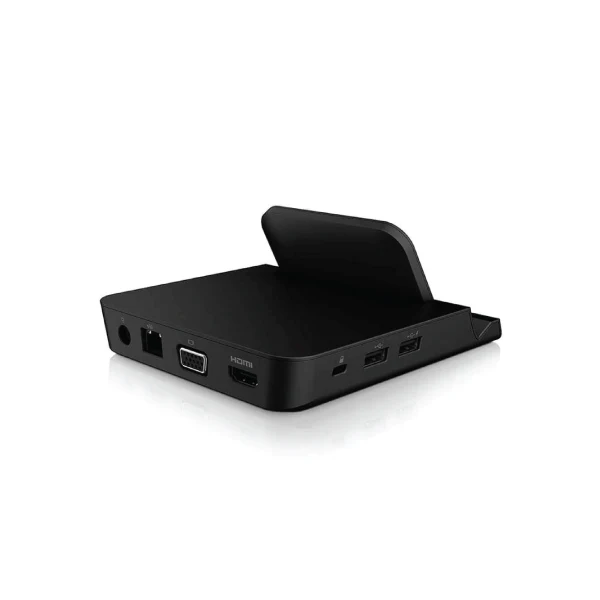
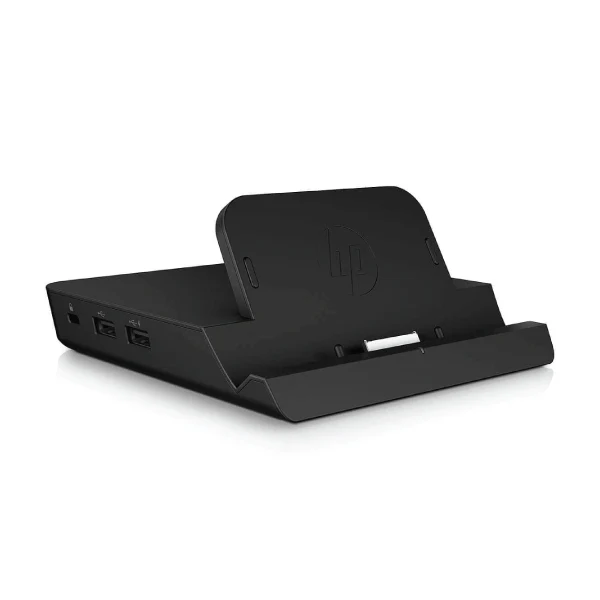
The Microsoft Surface Dock 1661 connects to your Surface Pro 3 or Surface Pro 4 via the proprietary Surface connector and instantly expands it with four USB 3.0 ports, dual Mini DisplayPort outputs, Gigabit Ethernet, and dedicated audio — all in a compact matte black chassis. No drivers required. Backed by a 12-month Reboot IT warranty with free standard AU shipping.
- Dual Monitor Support: Two Mini DisplayPort outputs let you connect two external displays simultaneously for an expanded workspace.
- 4 × USB 3.0 Ports: Fast data transfers from external drives, printers, and peripherals — two on the front for easy access.
- Gigabit Ethernet: Wired network connection for reliable internet without relying on Wi-Fi.
- Dedicated Audio Output: 3.5mm jack for headphones, speakers, or a conference call headset.
- Plug-and-Play: No drivers or software installation — connect and use immediately.
- Compact & Professional: Matte black finish, 76 × 184 × 54 mm footprint fits neatly on any desk.
Performance in Use
The Surface Dock 1661 is the cleanest way to transition your Surface Pro between portable and desktop use. At the desk, a single cable click connects all your peripherals at once — dual monitors, wired keyboard and mouse, Ethernet, and headset. Unplug and your Surface is immediately ready to go.
USB 3.0 speeds handle external SSD transfers, webcam feeds, and USB audio simultaneously without bottlenecking. Gigabit Ethernet replaces unreliable office Wi-Fi for video calls, large file transfers, and cloud backups. The dual Mini DP outputs support a variety of monitors — use Mini DP to DisplayPort, HDMI, or DVI adapters (sold separately) for compatibility with virtually any modern display.
The proprietary Surface connector delivers both data and power to the Surface Pro, so the dock doubles as a charging station. Your Surface charges through the dock while you work — no separate power cable needed at the desk.
Technical Specifications
| Specification | Details |
|---|---|
| Model | Microsoft Surface Dock 1661 |
| Compatible Devices | Surface Pro 3, Surface Pro 4 |
| Host Connection | Proprietary Surface connector (charges Surface Pro) |
| USB Ports | 4 × USB 3.0 Type-A |
| Video Outputs | 2 × Mini DisplayPort |
| Network | Gigabit Ethernet (10/100/1000) |
| Audio | 3.5mm audio output jack |
| Dimensions | 76 × 184 × 54 mm, 0.68 kg |
| Colour | Matte Black |
| Warranty | 12 months (Reboot IT) |
Is It Right for You?
|
✓ Best For: • Surface Pro 3 or 4 owners with a fixed desk • Office workers wanting dual-monitor setup • Remote workers needing wired Ethernet reliability • Corporate hot-desk environments with Surface fleets |
✗ Not For: • Surface Pro 5 (2017) or later — incompatible connector • Non-Surface devices (proprietary connector only) • Users needing USB-C or Thunderbolt ports • 4K display setups (Mini DP max is 4K at 30Hz) |
Condition Grades
| Grade | Cosmetic Condition | Functional Testing |
|---|---|---|
| A — Excellent | Minimal marks, clean connector and ports | All USB, video, and network ports verified |
| B — Good | Light wear, minor surface marks | All USB, video, and network ports verified |
Frequently Asked Questions
Will this dock work with Surface Pro 5 (2017) or later models?
No — the Surface Dock 1661 uses the proprietary Surface connector from the Pro 3/Pro 4 era. Surface Pro 5 (2017) and later models require a newer dock such as the Surface Dock 2.
Does this charge the Surface Pro while docked?
Yes — the dock connects via the Surface connector which carries both data and power. Your Surface Pro charges through the dock, no separate charger needed at the desk.
Do I need to install drivers?
No — the Surface Dock 1661 is plug-and-play on Surface Pro 3 and Surface Pro 4 running Windows 10. Simply connect and all ports become available immediately.
Can I use Mini DisplayPort to HDMI adapters?
Yes — standard Mini DP to HDMI, DVI, or DisplayPort adapters work with both video outputs, giving flexibility to connect virtually any modern monitor.
What are the shipping options?
Free standard AU shipping is included on all Surface Dock orders from Reboot IT.
Warranty & After-Sales Support
Every Microsoft Surface Dock sold by Reboot IT includes a 12-month warranty covering hardware defects and connectivity failures. Free standard AU shipping included.
Reboot IT has been Australia's trusted refurbished IT specialist since 2001. Every dock is tested — all ports verified — before dispatch. Melbourne-based support at reboot-it.com.au.
Original: $13.73
-65%$13.73
$4.81Product Information
Product Information
Shipping & Returns
Shipping & Returns
Description
Microsoft Surface Dock 1661 — Turn Your Surface Pro into a Full Desktop Workstation
The Microsoft Surface Dock 1661 connects to your Surface Pro 3 or Surface Pro 4 via the proprietary Surface connector and instantly expands it with four USB 3.0 ports, dual Mini DisplayPort outputs, Gigabit Ethernet, and dedicated audio — all in a compact matte black chassis. No drivers required. Backed by a 12-month Reboot IT warranty with free standard AU shipping.
- Dual Monitor Support: Two Mini DisplayPort outputs let you connect two external displays simultaneously for an expanded workspace.
- 4 × USB 3.0 Ports: Fast data transfers from external drives, printers, and peripherals — two on the front for easy access.
- Gigabit Ethernet: Wired network connection for reliable internet without relying on Wi-Fi.
- Dedicated Audio Output: 3.5mm jack for headphones, speakers, or a conference call headset.
- Plug-and-Play: No drivers or software installation — connect and use immediately.
- Compact & Professional: Matte black finish, 76 × 184 × 54 mm footprint fits neatly on any desk.
Performance in Use
The Surface Dock 1661 is the cleanest way to transition your Surface Pro between portable and desktop use. At the desk, a single cable click connects all your peripherals at once — dual monitors, wired keyboard and mouse, Ethernet, and headset. Unplug and your Surface is immediately ready to go.
USB 3.0 speeds handle external SSD transfers, webcam feeds, and USB audio simultaneously without bottlenecking. Gigabit Ethernet replaces unreliable office Wi-Fi for video calls, large file transfers, and cloud backups. The dual Mini DP outputs support a variety of monitors — use Mini DP to DisplayPort, HDMI, or DVI adapters (sold separately) for compatibility with virtually any modern display.
The proprietary Surface connector delivers both data and power to the Surface Pro, so the dock doubles as a charging station. Your Surface charges through the dock while you work — no separate power cable needed at the desk.
Technical Specifications
| Specification | Details |
|---|---|
| Model | Microsoft Surface Dock 1661 |
| Compatible Devices | Surface Pro 3, Surface Pro 4 |
| Host Connection | Proprietary Surface connector (charges Surface Pro) |
| USB Ports | 4 × USB 3.0 Type-A |
| Video Outputs | 2 × Mini DisplayPort |
| Network | Gigabit Ethernet (10/100/1000) |
| Audio | 3.5mm audio output jack |
| Dimensions | 76 × 184 × 54 mm, 0.68 kg |
| Colour | Matte Black |
| Warranty | 12 months (Reboot IT) |
Is It Right for You?
|
✓ Best For: • Surface Pro 3 or 4 owners with a fixed desk • Office workers wanting dual-monitor setup • Remote workers needing wired Ethernet reliability • Corporate hot-desk environments with Surface fleets |
✗ Not For: • Surface Pro 5 (2017) or later — incompatible connector • Non-Surface devices (proprietary connector only) • Users needing USB-C or Thunderbolt ports • 4K display setups (Mini DP max is 4K at 30Hz) |
Condition Grades
| Grade | Cosmetic Condition | Functional Testing |
|---|---|---|
| A — Excellent | Minimal marks, clean connector and ports | All USB, video, and network ports verified |
| B — Good | Light wear, minor surface marks | All USB, video, and network ports verified |
Frequently Asked Questions
Will this dock work with Surface Pro 5 (2017) or later models?
No — the Surface Dock 1661 uses the proprietary Surface connector from the Pro 3/Pro 4 era. Surface Pro 5 (2017) and later models require a newer dock such as the Surface Dock 2.
Does this charge the Surface Pro while docked?
Yes — the dock connects via the Surface connector which carries both data and power. Your Surface Pro charges through the dock, no separate charger needed at the desk.
Do I need to install drivers?
No — the Surface Dock 1661 is plug-and-play on Surface Pro 3 and Surface Pro 4 running Windows 10. Simply connect and all ports become available immediately.
Can I use Mini DisplayPort to HDMI adapters?
Yes — standard Mini DP to HDMI, DVI, or DisplayPort adapters work with both video outputs, giving flexibility to connect virtually any modern monitor.
What are the shipping options?
Free standard AU shipping is included on all Surface Dock orders from Reboot IT.
Warranty & After-Sales Support
Every Microsoft Surface Dock sold by Reboot IT includes a 12-month warranty covering hardware defects and connectivity failures. Free standard AU shipping included.
Reboot IT has been Australia's trusted refurbished IT specialist since 2001. Every dock is tested — all ports verified — before dispatch. Melbourne-based support at reboot-it.com.au.