Toshiba Dynadock U3.0 USB 3.0 Universal Docking Station HDMI + Adapter | Wty
Toshiba Dynadock U3.0 — USB 3.0 Universal Docking Station with Dual Display
The Toshiba Dynadock U3.0 transforms a single USB 3.0 port into a full desktop hub — dual monitors, six USB ports, Gigabit Ethernet, and 5.1 audio from one connection. Backed by a 12-month Reboot IT warranty with free standard AU shipping.
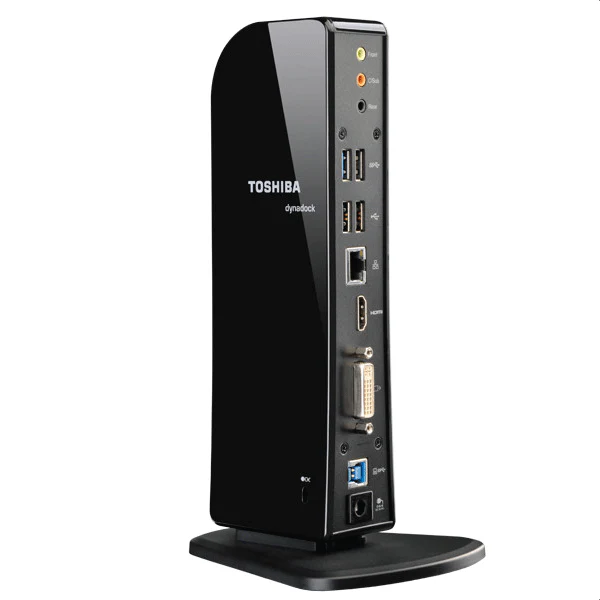
- Dual Display Support: Connect two monitors simultaneously via HDMI and DVI-I (or VGA via included adapter) at up to 2048×1152 resolution each.
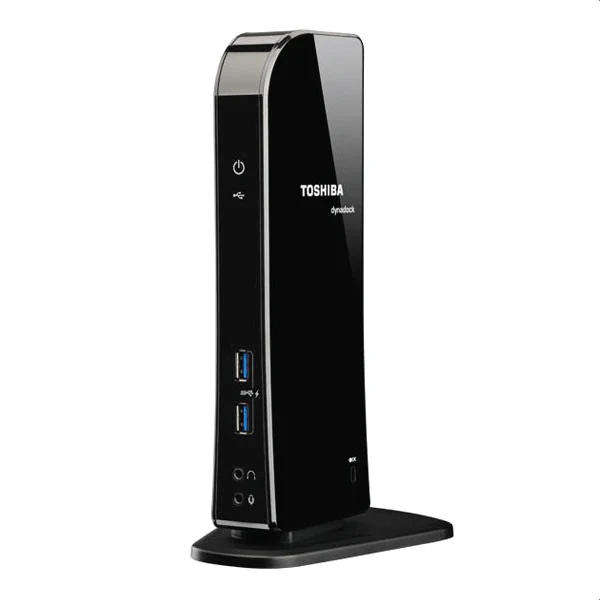
- 6 USB Ports: 2 front USB 3.0 with Sleep & Charge, 2 rear USB 3.0, and 2 rear USB 2.0 for all peripherals.
- Gigabit Ethernet: Reliable wired network for fast, stable office internet — no Wi-Fi dropouts.
- 5.1 Surround Audio: Full 5.1 channel via HDMI; 3.5mm line-in and line-out for headsets and speakers.
- Single-Cable Simplicity: One USB 3.0 cable to the dock powers your entire desk setup.
- Security Lock Slot: Kensington-compatible lock point protects the dock in shared environments.
Performance in Use
The Dynadock U3.0 is built for workers who move between a laptop and a fixed desk. Plug in once and your dual monitors, wired keyboard, mouse, network, headset, and external drives are all connected — without touching individual cables. DisplayLink rendering offloads display output over USB 3.0, delivering smooth performance for office applications, presentations, and video playback across two screens.
The front USB 3.0 Sleep & Charge ports keep phones and tablets charged even when the host laptop is sleeping — useful for meeting rooms or hot-desk environments. Gigabit Ethernet replaces unreliable Wi-Fi for file transfers, video calls, and cloud backups.
Compatibility is broad: any Windows laptop (Vista SP2 or later) with a USB 3.0 port works after the included DisplayLink driver is installed. USB 2.0 ports are also supported at reduced video bandwidth.
Technical Specifications
| Specification | Details |
|---|---|
| Model | Toshiba Dynadock U3.0 (PA3927A-1PRP) |
| Host Connection | USB 3.0 (backward compatible with USB 2.0) |
| Video Outputs | HDMI + DVI-I (DVI-to-VGA adapter included) |
| Max Resolution per Display | 2048 × 1152 |
| USB Ports | 4 × USB 3.0 (2 front Sleep & Charge, 2 rear), 2 × USB 2.0 rear |
| Network | Gigabit Ethernet (10/100/1000) |
| Audio | 5.1 via HDMI; 3.5mm line-in + line-out |
| Dimensions | 114 × 130 × 236 mm, 540 g |
| Security | Kensington lock slot |
| Warranty | 12 months (Reboot IT) |
Is It Right for You?
|
✓ Best For: • Laptop users wanting a dual-monitor desk setup • Hot-desk office environments • Home offices needing single-cable docking • Presenters needing dual-display flexibility |
✗ Not For: • Laptops without USB 3.0 port • 4K or high-refresh-rate display setups • Mac users (macOS not supported) • Thunderbolt-specific docking needs |
Condition Grades
| Grade | Cosmetic Condition | Functional Testing |
|---|---|---|
| A — Excellent | Minimal marks, clean ports | All ports and display outputs verified |
| B — Good | Light wear, minor scratches | All ports and display outputs verified |
Frequently Asked Questions
Does this work with any Windows laptop that has USB 3.0?
Yes — the Dynadock U3.0 is compatible with any Windows laptop (Vista SP2 or later) with a USB 3.0 port. DisplayLink driver installation is required for dual-display functionality. It also functions on USB 2.0 at reduced video bandwidth.
Can I use both HDMI and DVI outputs at the same time?
Yes — both display outputs operate simultaneously. Use HDMI for one monitor and DVI-I (or VGA via the included adapter) for a second monitor, each up to 2048×1152.
Does it support 1920×1080 Full HD?
Yes — 1080p Full HD is fully supported on both outputs.
Is a power adapter included?
Yes — the Dynadock U3.0 includes its own power supply and the USB 3.0 host cable.
What are the shipping options?
Free standard AU shipping is included on all Dynadock orders from Reboot IT.
Warranty & After-Sales Support
Every Toshiba Dynadock sold by Reboot IT includes a 12-month warranty covering hardware defects and port failures. Free standard AU shipping included.
Reboot IT has been Australia's trusted refurbished IT specialist since 2001. Every unit is tested before dispatch — all ports and display outputs verified. Melbourne-based support at reboot-it.com.au.
Original: $13.37
-65%$13.37
$4.68Product Information
Product Information
Shipping & Returns
Shipping & Returns
Description
Toshiba Dynadock U3.0 — USB 3.0 Universal Docking Station with Dual Display
The Toshiba Dynadock U3.0 transforms a single USB 3.0 port into a full desktop hub — dual monitors, six USB ports, Gigabit Ethernet, and 5.1 audio from one connection. Backed by a 12-month Reboot IT warranty with free standard AU shipping.
- Dual Display Support: Connect two monitors simultaneously via HDMI and DVI-I (or VGA via included adapter) at up to 2048×1152 resolution each.
- 6 USB Ports: 2 front USB 3.0 with Sleep & Charge, 2 rear USB 3.0, and 2 rear USB 2.0 for all peripherals.
- Gigabit Ethernet: Reliable wired network for fast, stable office internet — no Wi-Fi dropouts.
- 5.1 Surround Audio: Full 5.1 channel via HDMI; 3.5mm line-in and line-out for headsets and speakers.
- Single-Cable Simplicity: One USB 3.0 cable to the dock powers your entire desk setup.
- Security Lock Slot: Kensington-compatible lock point protects the dock in shared environments.
Performance in Use
The Dynadock U3.0 is built for workers who move between a laptop and a fixed desk. Plug in once and your dual monitors, wired keyboard, mouse, network, headset, and external drives are all connected — without touching individual cables. DisplayLink rendering offloads display output over USB 3.0, delivering smooth performance for office applications, presentations, and video playback across two screens.
The front USB 3.0 Sleep & Charge ports keep phones and tablets charged even when the host laptop is sleeping — useful for meeting rooms or hot-desk environments. Gigabit Ethernet replaces unreliable Wi-Fi for file transfers, video calls, and cloud backups.
Compatibility is broad: any Windows laptop (Vista SP2 or later) with a USB 3.0 port works after the included DisplayLink driver is installed. USB 2.0 ports are also supported at reduced video bandwidth.
Technical Specifications
| Specification | Details |
|---|---|
| Model | Toshiba Dynadock U3.0 (PA3927A-1PRP) |
| Host Connection | USB 3.0 (backward compatible with USB 2.0) |
| Video Outputs | HDMI + DVI-I (DVI-to-VGA adapter included) |
| Max Resolution per Display | 2048 × 1152 |
| USB Ports | 4 × USB 3.0 (2 front Sleep & Charge, 2 rear), 2 × USB 2.0 rear |
| Network | Gigabit Ethernet (10/100/1000) |
| Audio | 5.1 via HDMI; 3.5mm line-in + line-out |
| Dimensions | 114 × 130 × 236 mm, 540 g |
| Security | Kensington lock slot |
| Warranty | 12 months (Reboot IT) |
Is It Right for You?
|
✓ Best For: • Laptop users wanting a dual-monitor desk setup • Hot-desk office environments • Home offices needing single-cable docking • Presenters needing dual-display flexibility |
✗ Not For: • Laptops without USB 3.0 port • 4K or high-refresh-rate display setups • Mac users (macOS not supported) • Thunderbolt-specific docking needs |
Condition Grades
| Grade | Cosmetic Condition | Functional Testing |
|---|---|---|
| A — Excellent | Minimal marks, clean ports | All ports and display outputs verified |
| B — Good | Light wear, minor scratches | All ports and display outputs verified |
Frequently Asked Questions
Does this work with any Windows laptop that has USB 3.0?
Yes — the Dynadock U3.0 is compatible with any Windows laptop (Vista SP2 or later) with a USB 3.0 port. DisplayLink driver installation is required for dual-display functionality. It also functions on USB 2.0 at reduced video bandwidth.
Can I use both HDMI and DVI outputs at the same time?
Yes — both display outputs operate simultaneously. Use HDMI for one monitor and DVI-I (or VGA via the included adapter) for a second monitor, each up to 2048×1152.
Does it support 1920×1080 Full HD?
Yes — 1080p Full HD is fully supported on both outputs.
Is a power adapter included?
Yes — the Dynadock U3.0 includes its own power supply and the USB 3.0 host cable.
What are the shipping options?
Free standard AU shipping is included on all Dynadock orders from Reboot IT.
Warranty & After-Sales Support
Every Toshiba Dynadock sold by Reboot IT includes a 12-month warranty covering hardware defects and port failures. Free standard AU shipping included.
Reboot IT has been Australia's trusted refurbished IT specialist since 2001. Every unit is tested before dispatch — all ports and display outputs verified. Melbourne-based support at reboot-it.com.au.