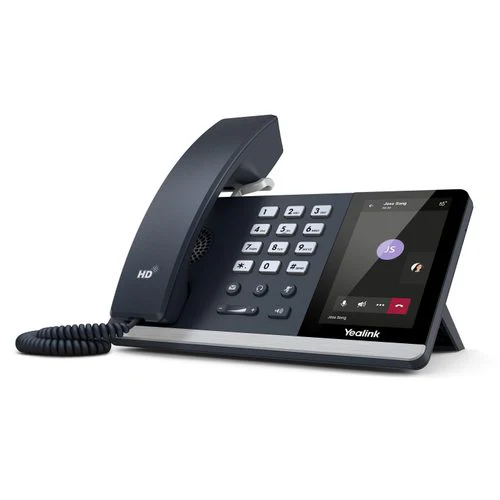
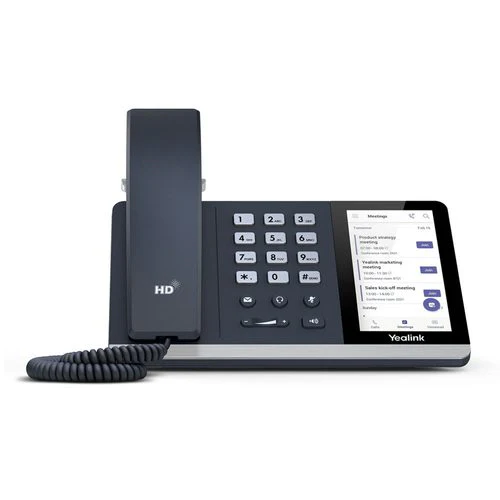
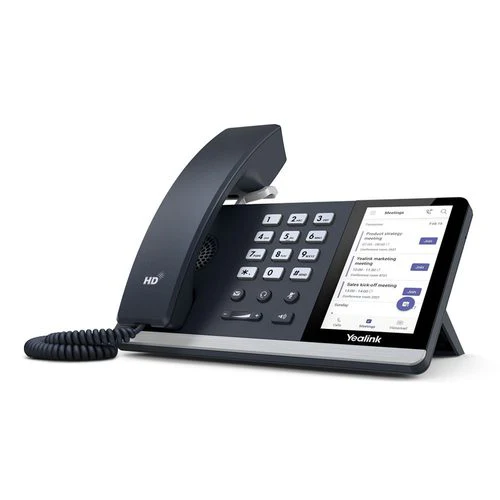
Yealink SIP-T55A MS Teams IP Phone 4.3in Touch GbE PoE WiFi BT Desk Wty
Yealink SIP-T55A Microsoft Teams IP Phone
The Yealink SIP-T55A is a Microsoft Teams-certified IP phone with a 4.3-inch colour touchscreen, built-in WiFi and Bluetooth, and Gigabit PoE — backed by a 12-month Reboot IT warranty. Designed for hot-desking, open-plan offices, and Teams-native deployments where flexibility and ease of use are priorities.
Key Benefits
- Microsoft Teams Native: Runs Teams firmware natively — sign in with your Microsoft 365 credentials and access Teams calls, meetings, and contacts directly from the phone.
- 4.3-Inch Touchscreen: Colour capacitive touchscreen for intuitive call management, calendar, and Teams interface navigation without a separate controller or PC.
- Built-In WiFi & Bluetooth: Connect wirelessly via WiFi 802.11 b/g/n/ac for flexible desk placement; pair headsets and devices via Bluetooth 4.2.
- Gigabit PoE: Dual Gigabit Ethernet ports with PoE (802.3af/at) — power the phone and passthrough to a PC from a single cable run.
- Optima HD Voice: Full-duplex HD audio with Yealink Noise Proof and echo cancellation ensures clear call quality in open-plan environments.
- Hot-Desk Ready: Sign in and out with Microsoft 365 credentials — ideal for hot-desking environments where multiple staff share the same phone.
Performance in Use
In a Microsoft Teams environment, the SIP-T55A removes the need to use a PC or mobile for every call. Staff sign in with their Microsoft 365 credentials and have instant access to their Teams contacts, calendar, and call history directly from the phone. The 4.3-inch touchscreen makes navigating the Teams interface natural and familiar — the same layout as the desktop app, on a purpose-built device.
The dual Gigabit ports with PoE passthrough mean the phone and a connected PC both receive network access from a single Ethernet run — practical in hot-desking and open-plan setups where cable management matters. WiFi support adds further flexibility for desk arrangements where Ethernet is not practical.
For IT teams, the SIP-T55A's Teams certification simplifies deployment: no complex SIP trunking configuration is required. Devices are managed through the Microsoft Teams admin centre alongside all other Teams-certified endpoints, making provisioning and updates straightforward at scale.
Tech Specs
| Display | 4.3-inch 480x272 colour touchscreen |
| Platform | Microsoft Teams (native), SIP also supported |
| WiFi | 802.11 b/g/n/ac (built-in) |
| Bluetooth | Bluetooth 4.2 (built-in) |
| Ethernet | 2 x Gigabit Ethernet (PoE + PC passthrough) |
| Power | PoE 802.3af/at or AC adapter |
| Audio | Optima HD, full-duplex, Noise Proof |
| USB | 1 x USB-A (headset or expansion) |
| Warranty | 12 months — Reboot IT |
Is It Right for You?
| Best For ✓ | Not For ✗ |
| Microsoft Teams-native office deployments | Non-Teams environments (Cisco, Avaya, Nortel) |
| Hot-desking & shared workstation setups | Analogue phone system (PSTN-only) environments |
| Open-plan offices needing wireless flexibility | Conference rooms needing 360° mic pickup |
| IT teams managing Teams endpoints at scale | Heavy outbound call centre use |
Condition Grades
| Grade | Condition | Cosmetics |
| A — Excellent | Fully tested & working | Minimal marks or scuffs, near-new appearance |
| B — Good | Fully tested & working | Light wear, scratches or marks visible on housing |
Frequently Asked Questions
Does the SIP-T55A run Microsoft Teams natively?
Yes. The SIP-T55A is Microsoft Teams certified and runs Teams firmware. Sign in with your Microsoft 365 account to access Teams calls, calendar, meetings, and contacts directly from the phone.
Can it also be used as a standard SIP phone?
Yes. The SIP-T55A supports both Teams and standard SIP mode — you can switch firmware between Teams and generic SIP to suit your deployment.
Does the phone need a power adapter?
No — the SIP-T55A is PoE (802.3af/at) powered. A single Ethernet cable from a PoE switch provides both network and power. An AC adapter can be used if PoE is unavailable.
Is it suitable for hot-desking?
Yes. Staff sign in and out with their Microsoft 365 credentials, making the SIP-T55A ideal for shared desks and flexible workspaces.
What are the shipping costs?
Shipping costs apply based on size and destination — rates are calculated at checkout.
12-Month Warranty & Reboot IT Assurance
Every Yealink SIP-T55A sold by Reboot IT is professionally inspected, cleaned, and tested before dispatch. Backed by a full 12-month warranty. Reboot IT has been Australia's trusted refurbished IT specialist since 2001 — visit us at reboot-it.com.au.
Original: $28.18
-65%$28.18
$9.86Product Information
Product Information
Shipping & Returns
Shipping & Returns
Description
Yealink SIP-T55A Microsoft Teams IP Phone
The Yealink SIP-T55A is a Microsoft Teams-certified IP phone with a 4.3-inch colour touchscreen, built-in WiFi and Bluetooth, and Gigabit PoE — backed by a 12-month Reboot IT warranty. Designed for hot-desking, open-plan offices, and Teams-native deployments where flexibility and ease of use are priorities.
Key Benefits
- Microsoft Teams Native: Runs Teams firmware natively — sign in with your Microsoft 365 credentials and access Teams calls, meetings, and contacts directly from the phone.
- 4.3-Inch Touchscreen: Colour capacitive touchscreen for intuitive call management, calendar, and Teams interface navigation without a separate controller or PC.
- Built-In WiFi & Bluetooth: Connect wirelessly via WiFi 802.11 b/g/n/ac for flexible desk placement; pair headsets and devices via Bluetooth 4.2.
- Gigabit PoE: Dual Gigabit Ethernet ports with PoE (802.3af/at) — power the phone and passthrough to a PC from a single cable run.
- Optima HD Voice: Full-duplex HD audio with Yealink Noise Proof and echo cancellation ensures clear call quality in open-plan environments.
- Hot-Desk Ready: Sign in and out with Microsoft 365 credentials — ideal for hot-desking environments where multiple staff share the same phone.
Performance in Use
In a Microsoft Teams environment, the SIP-T55A removes the need to use a PC or mobile for every call. Staff sign in with their Microsoft 365 credentials and have instant access to their Teams contacts, calendar, and call history directly from the phone. The 4.3-inch touchscreen makes navigating the Teams interface natural and familiar — the same layout as the desktop app, on a purpose-built device.
The dual Gigabit ports with PoE passthrough mean the phone and a connected PC both receive network access from a single Ethernet run — practical in hot-desking and open-plan setups where cable management matters. WiFi support adds further flexibility for desk arrangements where Ethernet is not practical.
For IT teams, the SIP-T55A's Teams certification simplifies deployment: no complex SIP trunking configuration is required. Devices are managed through the Microsoft Teams admin centre alongside all other Teams-certified endpoints, making provisioning and updates straightforward at scale.
Tech Specs
| Display | 4.3-inch 480x272 colour touchscreen |
| Platform | Microsoft Teams (native), SIP also supported |
| WiFi | 802.11 b/g/n/ac (built-in) |
| Bluetooth | Bluetooth 4.2 (built-in) |
| Ethernet | 2 x Gigabit Ethernet (PoE + PC passthrough) |
| Power | PoE 802.3af/at or AC adapter |
| Audio | Optima HD, full-duplex, Noise Proof |
| USB | 1 x USB-A (headset or expansion) |
| Warranty | 12 months — Reboot IT |
Is It Right for You?
| Best For ✓ | Not For ✗ |
| Microsoft Teams-native office deployments | Non-Teams environments (Cisco, Avaya, Nortel) |
| Hot-desking & shared workstation setups | Analogue phone system (PSTN-only) environments |
| Open-plan offices needing wireless flexibility | Conference rooms needing 360° mic pickup |
| IT teams managing Teams endpoints at scale | Heavy outbound call centre use |
Condition Grades
| Grade | Condition | Cosmetics |
| A — Excellent | Fully tested & working | Minimal marks or scuffs, near-new appearance |
| B — Good | Fully tested & working | Light wear, scratches or marks visible on housing |
Frequently Asked Questions
Does the SIP-T55A run Microsoft Teams natively?
Yes. The SIP-T55A is Microsoft Teams certified and runs Teams firmware. Sign in with your Microsoft 365 account to access Teams calls, calendar, meetings, and contacts directly from the phone.
Can it also be used as a standard SIP phone?
Yes. The SIP-T55A supports both Teams and standard SIP mode — you can switch firmware between Teams and generic SIP to suit your deployment.
Does the phone need a power adapter?
No — the SIP-T55A is PoE (802.3af/at) powered. A single Ethernet cable from a PoE switch provides both network and power. An AC adapter can be used if PoE is unavailable.
Is it suitable for hot-desking?
Yes. Staff sign in and out with their Microsoft 365 credentials, making the SIP-T55A ideal for shared desks and flexible workspaces.
What are the shipping costs?
Shipping costs apply based on size and destination — rates are calculated at checkout.
12-Month Warranty & Reboot IT Assurance
Every Yealink SIP-T55A sold by Reboot IT is professionally inspected, cleaned, and tested before dispatch. Backed by a full 12-month warranty. Reboot IT has been Australia's trusted refurbished IT specialist since 2001 — visit us at reboot-it.com.au.